GitHub Free: Who It's For and How to Set It Up
GitHub Free is the tier every GitHub account starts on — no cost, no credit card, unlimited public and private repositories. GitHub's own pricing page even labels it "the basics for individuals and organizations," and technically that's true: nothing stops a company from building its entire codebase on a Free account. Plenty do. That doesn't mean they should — and this page exists specifically to walk through why, because it's the one place in this series where the honest answer is "don't," not "here's how."
If you're one person — a personal project, a portfolio, learning to code, contributing to open source — Free is exactly the right tier, and the sign-up steps below are all you need. If you're setting this up for a company, read the two sections after the pros and cons before you do anything else.
What Free actually includes, compared to Team and Enterprise:
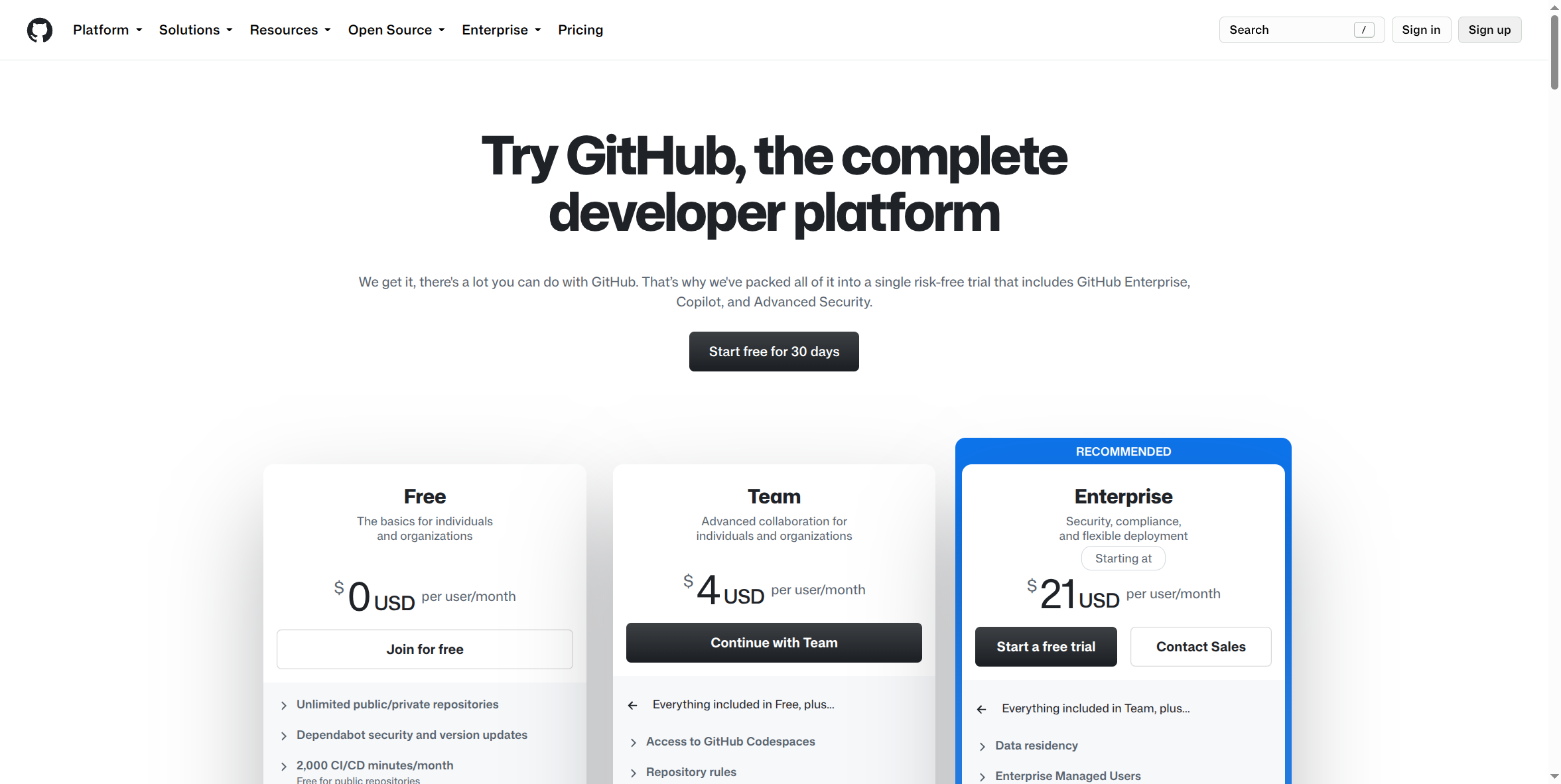
$0 per user/month. Unlimited public and private repositories, Dependabot security and version updates, and 2,000 CI/CD minutes a month (free entirely for public repositories). No seat count, no admin console, no billing relationship with GitHub beyond the account itself.
Pros:
- It's genuinely free, with no trial clock and no feature-limited demo — real headroom for personal projects, open source, and learning.
- Unlimited private repositories — not gated behind a paid plan the way some competitors gate private hosting.
- Dependabot is included, not an upsell — your dependencies get scanned for known vulnerabilities from day one.
- No commitment of any kind. Close the account any time; there's no invoice trail, no seat to cancel.
- Perfectly adequate for exactly what it's built for — one person's own work.
Cons:
- No admin console, no organization-level identity controls. There's nothing here to centrally see who has access to what, or to revoke it in one place.
- No per-seat billing structure, which means there's no accounting mechanism for multi-person use in the first place — see below for what fills that gap in practice, and why it's a problem.
- Support is community and best-effort — no SLA, no account rep, nobody to call.
- No enterprise-grade data or security terms. A Free account's terms are the same as any consumer sign-up.
Why this isn't right for a company
GitHub Free is not recommended for corporate or organizational use. That's not a stylistic caution — it's the plain conclusion once you look at what Free actually is: a single personal identity, with no company-level layer sitting above it. There's no SSO tying access to your company's identity provider, no way to enforce two-factor authentication across everyone touching your code, no audit log an admin can pull up, and no mechanism to say "this person's access ends today" that doesn't depend on someone remembering to do it, repository by repository. The "Why Your Company Needs a Secured AI Account" course makes this same argument about AI tools — a personal account is a personal account no matter what it's holding, and source code is exactly the kind of asset that argument was written for. GitHub's own Enterprise features (SSO, audit logs, enforced 2FA, IP allow lists) exist precisely because a company's entire codebase is a fundamentally different risk than one person's repositories — that gap doesn't close by choosing not to look at it.
How people actually share one Free account — and the real risk
Here's what actually happens instead, and it's worth describing plainly because it's common, not rare: a small team or agency, instead of paying for individual seats or setting up a real Organization, creates a single GitHub account — one email, one password — and hands the login to everyone who needs it. Sometimes it's a shared password in a spreadsheet or password manager entry; sometimes it's a shared SSH key or personal access token passed around in a Slack message. Every commit, every push, every action shows up under one identity, because as far as GitHub can tell, there is only one person.
This isn't a hypothetical edge case — it's the predictable result of Free having no per-seat mechanism at all, and it creates four real, specific problems, not vague ones:
- No per-user audit trail. When five people share one login, "who pushed this change" and "who deleted that branch" both have the same answer: the shared account. If something breaks, or something needs to be traced back to a specific person — a bug, a leaked secret, a malicious commit — there is no way to know who actually did it. The account, not a person, is what the logs show.
- You can't revoke one person's access without changing the password for everyone. The moment someone leaves the company — voluntarily or not — the only way to cut off their access is to change the shared password, which means re-distributing new credentials to every other person still using the account. In practice this step gets skipped, delayed, or done sloppily, because it's disruptive to everyone, not just the person who left. A departed employee or contractor keeping working access to your entire codebase is a genuinely common outcome of this pattern, not a worst-case scenario.
- No SSO, and no way to enforce 2FA at the organization level. A shared personal account authenticates exactly one way: whatever that one account's login method is. There's no company identity provider in the loop, no centralized policy that says "everyone touching this account must have 2FA enabled." If 2FA is on at all, it protects the single shared credential — not each individual person using it, and not against that credential leaking.
- It violates the unique-identification requirements that SOC 2, HIPAA-adjacent obligations, and CMMC all share. Nearly every serious compliance framework requires that system access can be traced to an individual, uniquely identified user — not a shared credential used by a group. A shared GitHub account fails this requirement by design, not by misconfiguration. If your company is ever subject to a SOC 2 audit, a HIPAA-adjacent security review, or a CMMC assessment, a shared account touching source code is not a minor finding — it's a structural one, and it surfaces exactly when you can least afford a surprise: during the audit itself, or a customer's security questionnaire.
None of this requires malice or a mistake to go wrong — it's just what a shared login with no admin layer produces by design. The fix isn't a better password policy for the shared account; it's not sharing one account at all. That's what GitHub Team and GitHub Enterprise exist to solve, with real per-user seats and, at the Enterprise tier, the SSO and audit logging this section describes the absence of.
How to sign up:
- Go to github.com and select Sign up, or go directly to github.com/signup.
- Enter your email, create a password, and choose a username.
- Verify your email address when GitHub sends the confirmation code.
- You land on a Free account automatically — there's no separate "choose Free" step; every new GitHub account starts here.
GitHub's own signup page blocked this page's automated screenshot capture (it returned "Access is temporarily restricted" on repeated attempts, including the github.com/join alias) — the actual signup form screens aren't shown above. The "Join for free" button visible in the pricing comparison screenshot is the same entry point these steps walk through.
What this guide doesn't cover yet: the actual post-signup account settings screens, and what a real shared-account setup looks like from the inside (credential storage, commit history under one identity) — both would need a real account to capture accurately rather than describing secondhand, and haven't been screenshotted yet.
If you're setting this up for more than one person: stop here and look at GitHub Team instead (own setup guide) — it has real per-seat billing and an actual Organization with Teams and permission levels behind it. If your company has a compliance obligation around audit logging or centralized access control, look past Team to GitHub Enterprise (own setup guide), which is where SSO and org-wide audit logs actually live.