GitHub Enterprise: Who It's For and How to Set It Up
GitHub Enterprise is the tier built for one specific question, not a longer feature list: does your organization have a real, specific reason it needs centralized identity, a real audit trail, and support with an SLA behind it — usually because a compliance framework requires it, not because more features sounds nice. Your engineering team almost certainly already runs fine on Free or Team for the actual work of writing, reviewing, and shipping code. Enterprise isn't about doing that work better — it's about what happens when someone outside your company (a regulator, an auditor, a customer's security team) asks you to prove how access to your source code is controlled.
What Enterprise actually costs and includes, compared to Free and Team:
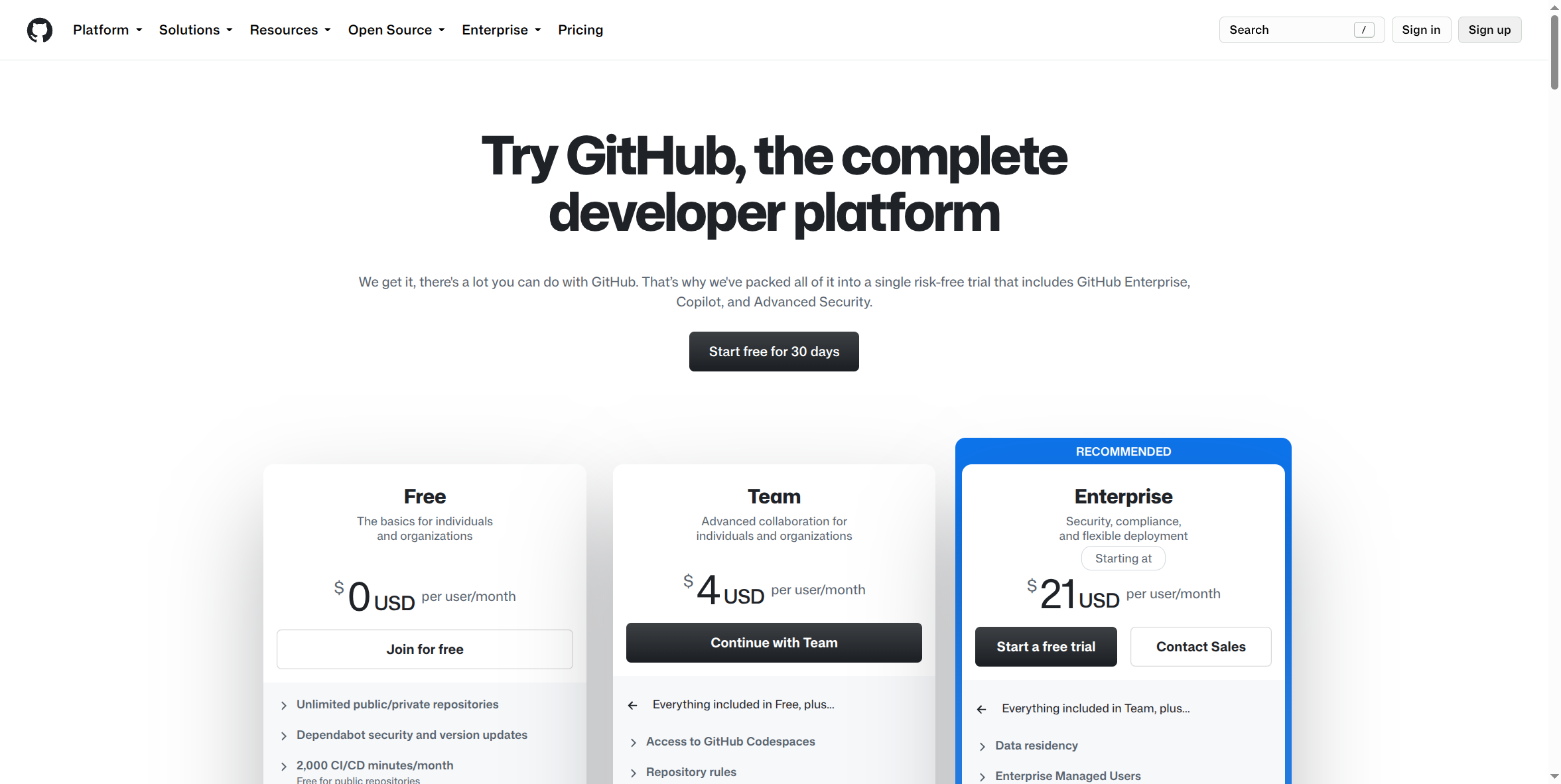
Enterprise starts at $21 per user/month. Everything in Team, plus data residency options and Enterprise Managed Users — and, per GitHub's own published feature set, SAML single sign-on tied to your company's identity provider, organization-wide audit logs, enforced two-factor authentication at the org level, and IP allow lists restricting access to specific networks.
What Enterprise buys you, in business terms — not features, outcomes:
- A revocation kill-switch. The instant someone leaves the company, their access to every repository is gone, centrally — not dependent on someone remembering to remove them from each project individually.
- A real audit trail. If a regulator, auditor, or client ever asks "who touched this code and when," Enterprise has an answer. Free and Team, practically speaking, do not — at the depth most compliance frameworks expect.
- A support contract with teeth. Enterprise includes SLA-backed support, not the community or best-effort support that Free and Team come with.
Cons — the trap on both sides:
- Buying it "to be safe" with no specific requirement driving it is money spent closing a gap that may not exist. At $21/seat/month and up, that's a real, recurring cost for a team that may not need what it's paying for.
- Skipping it when a real compliance obligation exists is the far more expensive mistake. It tends to surface during an audit or a customer's security questionnaire, not on your own timeline — exactly when you have the least room to fix it quickly.
- The one question that should actually decide this: is your organization subject to a compliance framework (SOC 2, HIPAA-adjacent obligations, industry-specific regulation) that requires audit logging or centralized access control on your source code? If yes, this stops being a nice-to-have. If no, and your team is small enough that access management is genuinely reliable today, Team may be the right call for now.
- Higher per-seat cost with a real floor. Enterprise starts well above Team's $4/seat, and self-serve Enterprise Cloud still carries real per-seat costs even before considering a sales-negotiated annual contract.
How to sign up:
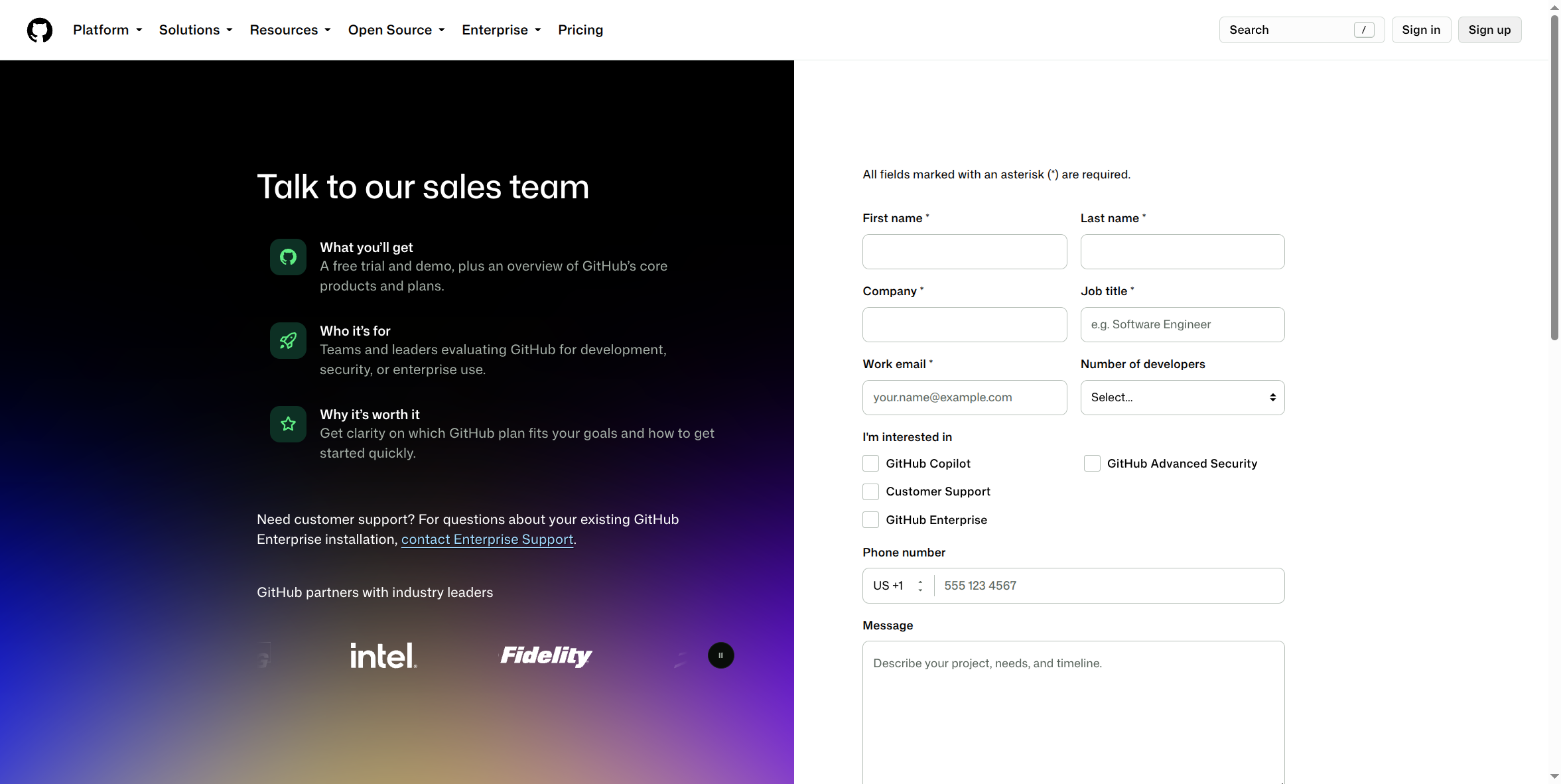
GitHub Enterprise has two real entry points, not one:
- Self-serve trial. From github.com/pricing, the Enterprise card includes a Start a free trial button — a 30-day trial of GitHub Enterprise Cloud you can start without talking to sales. This is a real, current option, worth knowing about if the assumption going in was "Enterprise always requires a sales conversation" — it doesn't, at least not to see it.
- Contact Sales. The same pricing card also has Contact Sales, which leads to a form (shown above) at github.com/enterprise/contact asking for your name, company, work email, and team size. This is the path for an annual, negotiated contract, or for GitHub Enterprise Server (self-hosted) rather than the cloud-hosted version — and it's still the more common path for an organization actually rolling Enterprise out company-wide, since seat counts and terms typically get negotiated rather than taken at self-serve list price.
What this guide doesn't cover yet: the actual admin console screens — SSO/SAML configuration, provisioning, audit log views — require a real, paid, logged-in Enterprise account to capture accurately, and haven't been screenshotted yet. This page will be updated once that access exists, rather than guessing at what those screens look like.
Before committing to this tier: ask whoever manages your compliance obligations (or research it yourself if that's you) one direct question — does anything your company is legally or contractually required to do depend on audit logs or centralized access revocation for your source code? That answer, not a general instinct toward "more secure is always better," is what should actually drive this budget line.