GitHub Copilot Pro: Who It's For and How to Set It Up
GitHub Copilot is not GitHub. GitHub is the code-hosting platform — repositories, pull requests, issues. GitHub Copilot is a separate, paid AI pair-programmer that plugs into your editor, the GitHub CLI, and github.com itself: inline code suggestions, chat, and an "agent mode" that can plan and write multi-file changes. You can have a completely free GitHub account with zero Copilot on it, and this guide is about the Copilot layer only — see the separate GitHub setup guides if what you actually need is the hosting platform.
Copilot Pro is the first paid individual tier — one person, one subscription, tied to that person's personal GitHub account, no org admin console attached. If you're evaluating this for more than one person at your company, read the Cons below before you buy five of these.
What Pro actually costs and includes, compared to Free, Pro+, and Max:
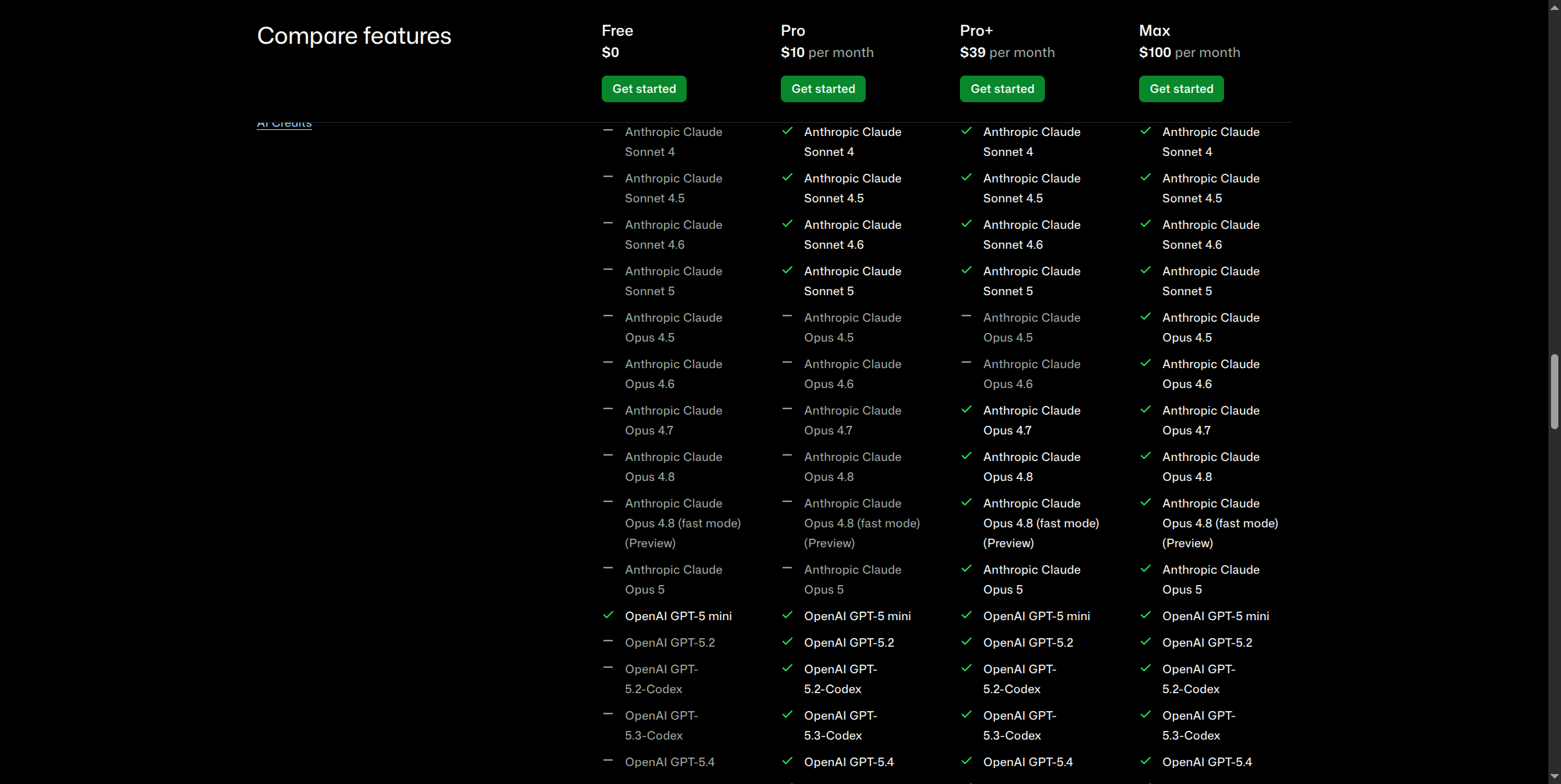
Pro is $10/month, Pro+ is $39/month, Max is $100/month, Free is $0. As of June 1, 2026, GitHub replaced its old "premium request" counting model with GitHub AI Credits — usage-based billing where chat, agent mode, code review, the cloud agent, and Copilot CLI all draw down a monthly credit pool, calculated from actual token consumption at each model's published rate. Pro's $10/month includes $10 in monthly AI Credits as a base allotment, plus an optional "Flex allotment" (currently $5/month) for variable additional usage beyond that. Code completions and Next Edit suggestions are unlimited and free on every paid tier — they don't touch your AI Credits at all; only Free caps those at 2,000/month.
Pros:
- Multiple frontier models under one subscription. Unlike a single-vendor AI subscription, Pro's model picker includes Anthropic Claude, OpenAI GPT, Google Gemini, and xAI Grok models side by side inside the same chat and agent-mode interface.
- Agent mode and the cloud agent are included at Pro, not gated to a higher tier — you can assign Copilot a task and it opens a pull request on its own.
- It lives where you already work. No separate app to context-switch into — it's the same editor (VS Code, Visual Studio, JetBrains, Xcode, and others), the same terminal (Copilot CLI), and the same GitHub.com you already use for pull requests and issues.
- Unlimited inline completions, versus Free's 2,000/month cap — the day-to-day autocomplete experience most developers actually live in.
Cons:
- It's a personal account, full stop. No SSO, no admin console, no centralized billing, no way for your company to revoke access the instant someone leaves — the license lives on that person's individual GitHub account. See the "Why Your Company Needs a Secured AI Account" course for why that's a real risk at any scale beyond one person.
- The $10/month "price" is a floor, not a flat rate. Usage-based AI Credits billing means heavy agentic use — long autonomous coding sessions, large multi-file agent-mode runs — can draw down your included credits faster than the old counted-requests model did, especially for anyone used to the pre-June-2026 flat-rate mental model. There's no free fallback to a cheaper model anymore when credits run low; usage is simply governed by what's available.
- No volume pricing. Five people on Pro individually costs 5× the per-seat price with zero org discount — see GitHub Copilot Business for the tier that actually fixes this.
- No enterprise-grade data terms. A personal Pro subscription's terms are the same as any consumer signup — no explicit no-training or limited-retention commitment in writing the way business/enterprise agreements typically include.
How to sign up and install:
The install mechanism is the same regardless of which paid tier you're on — a single editor extension that recognizes whatever subscription or seat is tied to the GitHub account you sign into.
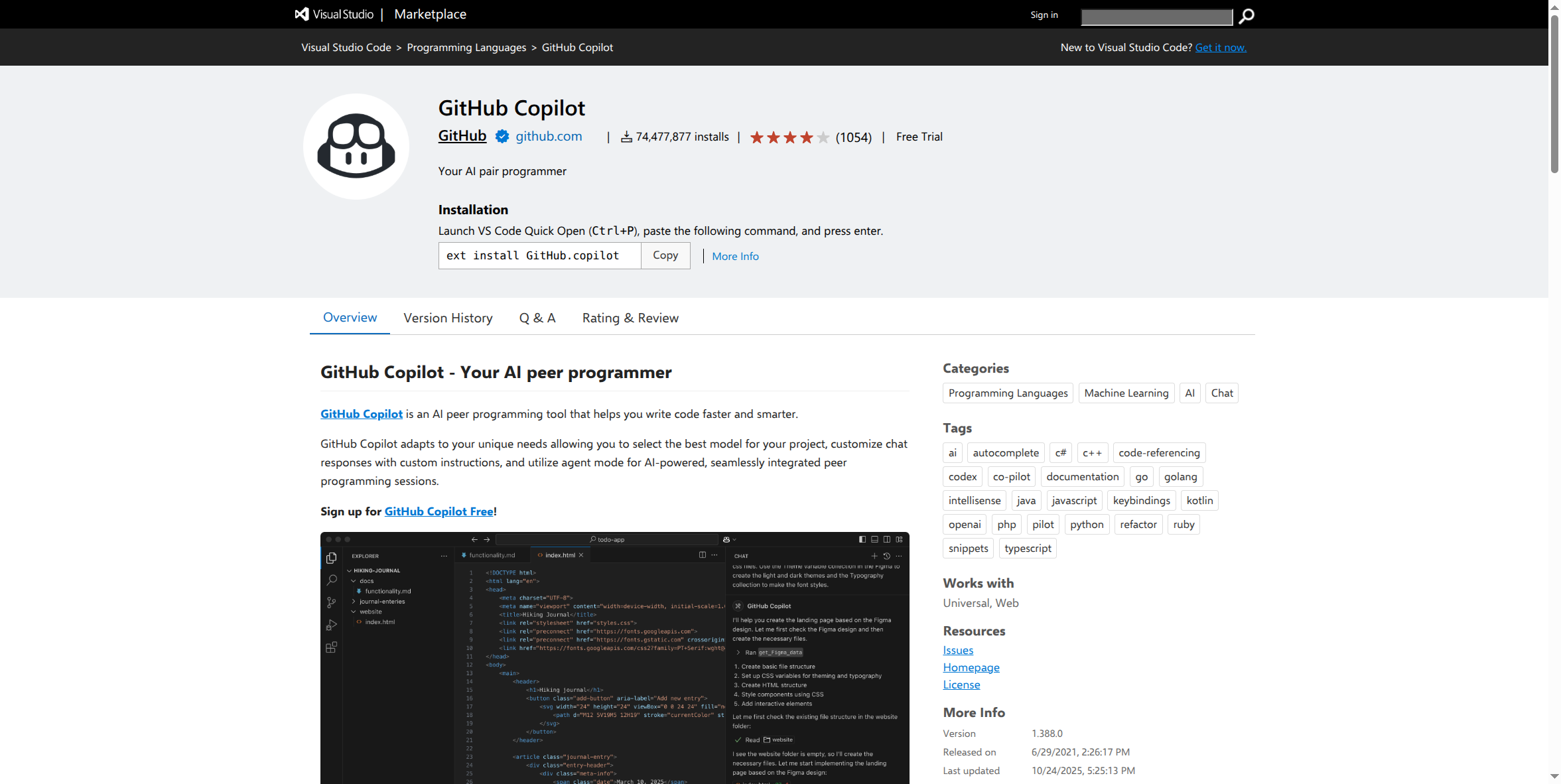
- Go to github.com/features/copilot/plans, sign in (or create a free GitHub account first), and choose Pro → Get started — GitHub walks you through payment inside its own checkout.
- In your editor, open Quick Open (Ctrl+P in VS Code) and run
ext install GitHub.copilot, or install it from the editor's extension marketplace directly. - Sign in to the extension with the same GitHub account you subscribed with. Your Pro subscription is recognized automatically — no separate license key.
- Optional: install Copilot CLI to use the same agent from your terminal instead of (or alongside) your editor.
What this guide doesn't cover yet: the actual post-signup extension settings inside a real IDE (model picker defaults, custom instructions setup) and the live account billing/usage screen — those require a real, paid, logged-in session to capture accurately, and haven't been screenshotted yet. This page will be updated once that access exists, rather than guessing at what those screens look like.
If you're setting this up for more than one person: stop here and look at GitHub Copilot Business instead (own setup guide) — it's built for exactly this, with per-seat org billing, centralized seat assignment, and the pooled-credit and admin-policy controls Pro simply doesn't have.