Claude Enterprise: Who It's For and How to Set It Up
Claude Enterprise is Anthropic's tier for large businesses operating at scale — the same feature base as Claude Team, plus the compliance and access-control layer a regulated organization, a large IT department, or a company under a specific audit requirement actually needs. Most organizations don't need this. If you're a small or mid-size company without a specific compliance driver forcing the question, start with Claude Team instead (own setup guide: see Claude Team) — it already includes SSO, central billing, and an admin console for up to 150 seats, at a lower and simpler price. Enterprise exists for what Team deliberately leaves out.
What Enterprise actually costs and includes:
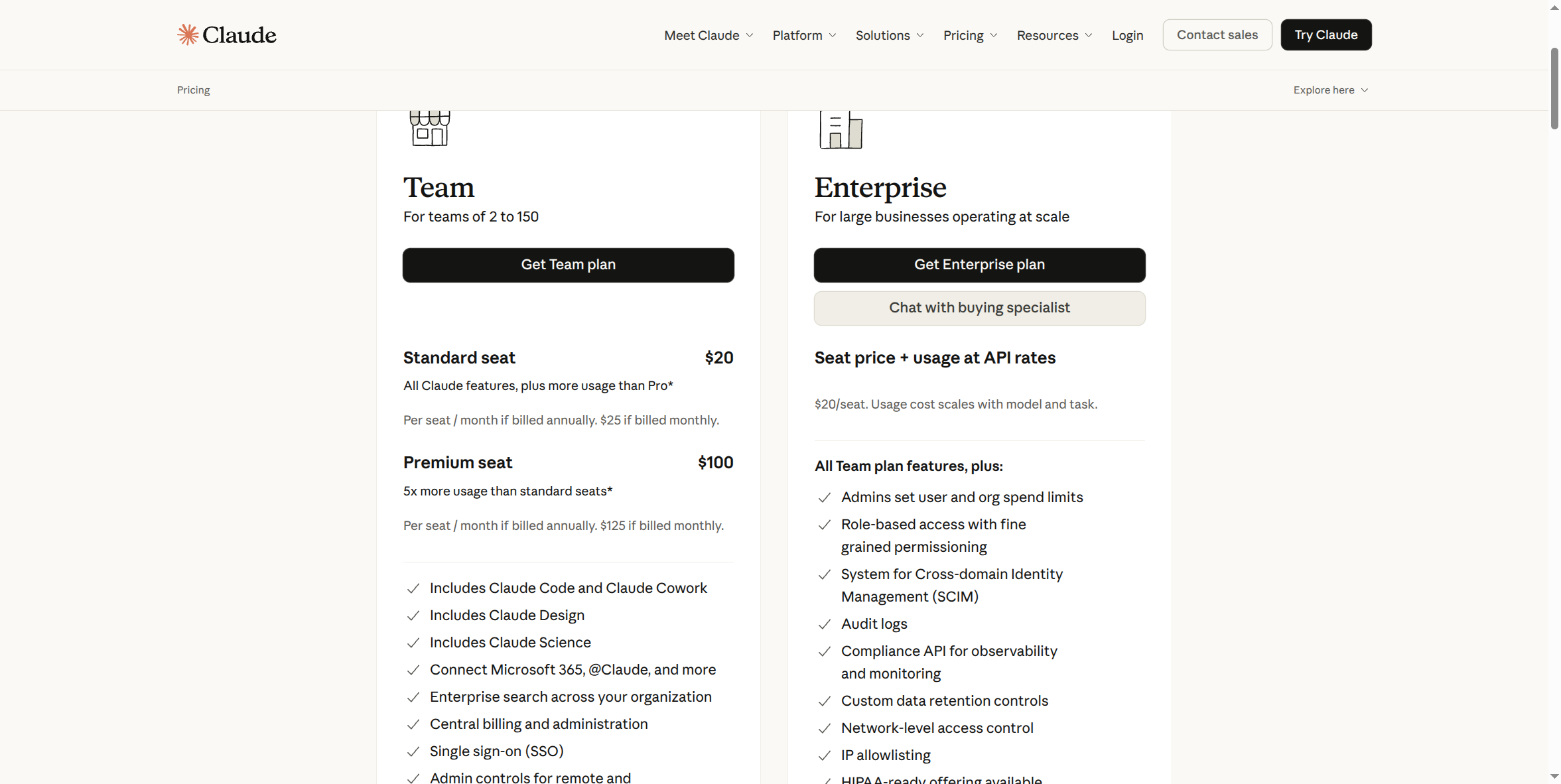
Enterprise is priced at $20/seat/month — the same as Team's Standard seat — plus usage billed at API rates on top, so total cost scales with how much your organization actually uses Claude, not just seat count. Unlike Team, Enterprise is billed annually; there's no monthly option. There's also no single published "Enterprise price" for this reason — the seat price is fixed, the usage cost isn't.
Two real paths into Enterprise, not one:
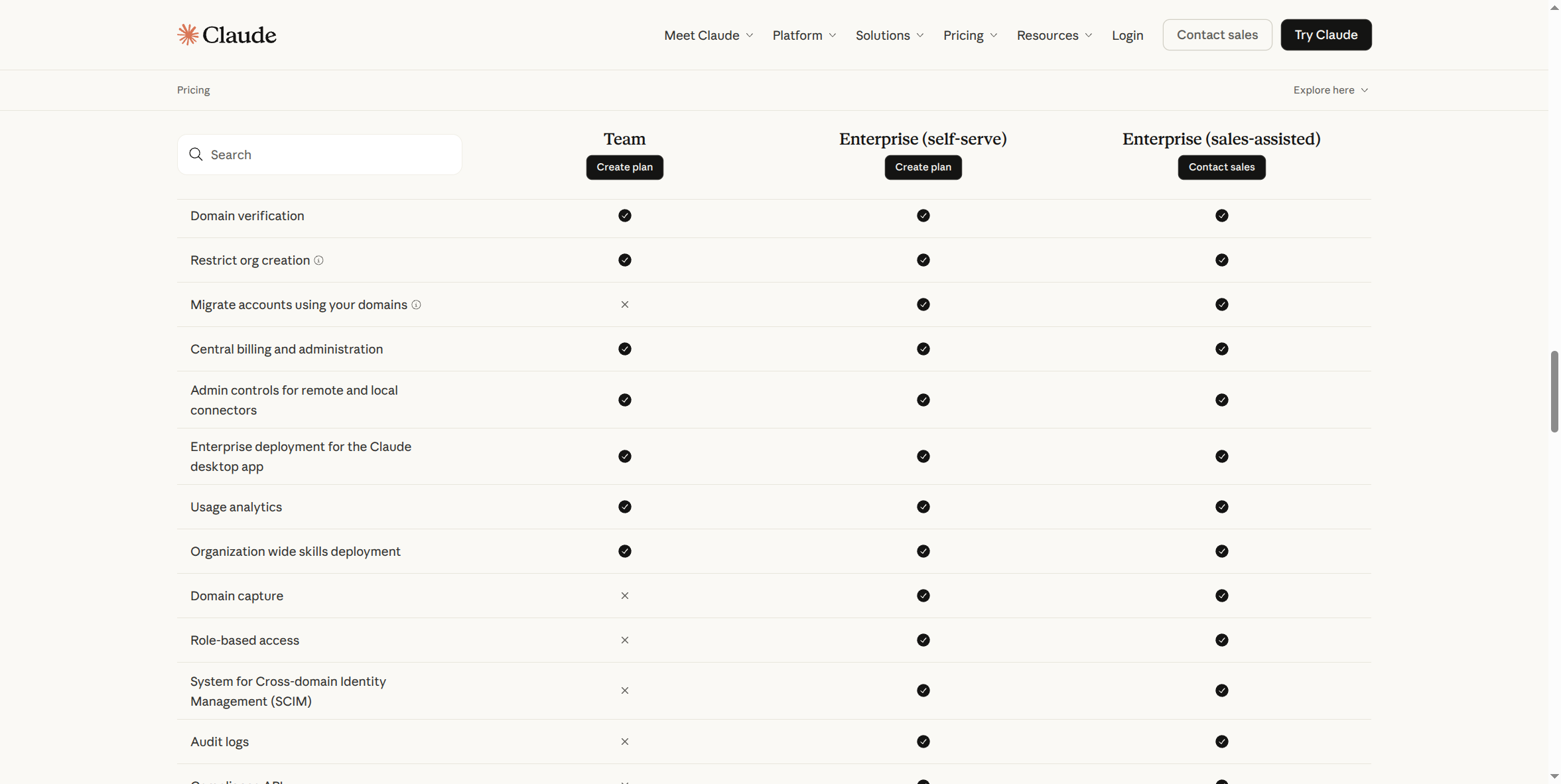
- Enterprise (self-serve): buy directly from the pricing page with no sales call — available if your organization doesn't need more than 500 seats and doesn't need a tailored contract (custom usage commitments, product bundling).
- Enterprise (sales-assisted): contact sales or chat with a buying specialist — required once you're past 500 seats or need a negotiated contract. As the comparison table above shows, the two paths are feature-identical; only the buying motion differs.
Pros (what Enterprise adds on top of Team):
- Role-based access with fine-grained permissioning. Not just who has access, but what each person can actually do.
- SCIM (System for Cross-domain Identity Management). Automated, identity-provider-driven provisioning and deprovisioning — someone leaves the company, their Claude access disappears without an admin having to remember to revoke it manually.
- Audit logs and a Compliance API. A real, provable answer when someone — a regulator, a client, your own leadership — asks whether company data touched this tool and what happened to it. See the "Why Your Company Needs a Secured AI Account" course for why that answer matters.
- Domain capture. Stops a rogue individual account from existing under your company's own email domain — a gap Team doesn't close.
- Custom data retention controls, network-level access control, IP allowlisting, and a HIPAA-ready offering. The specific pieces that matter if you're under a real regulatory or contractual requirement.
- Admin-set spend limits, at both the user and org level, on top of usage-based billing.
Cons:
- A real cost floor, not a token 1-seat trial. You're paying Team's per-seat rate plus metered usage at API rates, and Enterprise is billed annually — no month-to-month option to test the waters first.
- Self-serve is capped, not floor-priced. Claude's own signup flow gates self-serve at 500 seats and a standard, non-negotiated contract — need more seats or custom terms and you're routed to a sales conversation before you can buy at all. (Earlier planning for this series assumed Enterprise required a fixed seat minimum; the actual constraint found on Claude's live pricing and signup flow is a self-serve ceiling at 500 seats, not a seat floor — worth knowing before you assume a minimum spend is the blocker.)
- Self-serve and sales-assisted are feature-identical. Don't assume paying for a sales conversation buys you more capability — it doesn't, per Claude's own comparison table.
- Every Enterprise feature beyond Team only pays for itself against a real requirement. SCIM, audit logs, role-based access, IP allowlisting, and the rest exist to satisfy a specific compliance or scale need. Buying Enterprise "to be safe" with no requirement behind it is money spent on controls nobody configures or checks.
How to get started:
- Go to claude.ai/pricing, switch to the Team & Enterprise tab, and choose Get Enterprise plan (self-serve) or Chat with buying specialist / Contact sales (sales-assisted) — both sit side by side on the same pricing view.
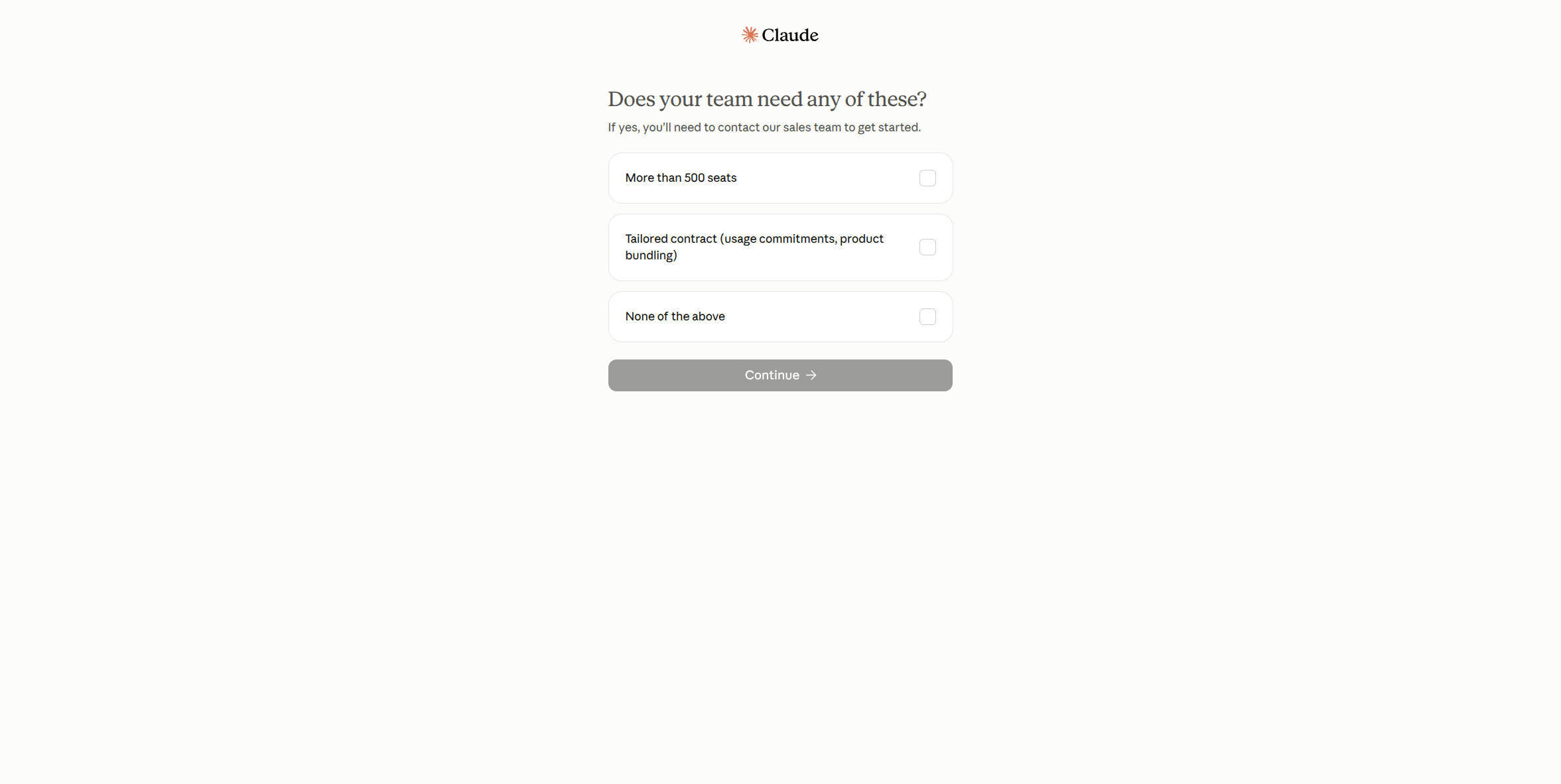
- The self-serve path opens with a qualifying question: does your team need more than 500 seats, or a tailored contract? Answer honestly — checking either box routes you to sales instead of letting you buy directly.
- If neither applies, you continue into the same account-creation screen every Claude tier uses (Google, Apple, or email), then into Enterprise-specific setup — company domain, billing, and seat count — inside Claude's own checkout.
What this guide doesn't cover yet: the actual Enterprise admin console — SCIM configuration against a real identity provider, audit log export, IP allowlist setup, custom data retention configuration — those screens require a real, paid, logged-in Enterprise admin session to capture accurately, and haven't been screenshotted yet. This page will be updated with that once that access exists, rather than guessing at what those screens look like.
If you're not sure you actually need everything above, you probably don't. Claude Team already covers SSO, central billing, and an admin console for up to 150 seats, at a lower and simpler price with no annual commitment required. Start there (own setup guide: see Claude Team), and only come back to Enterprise once a specific compliance requirement, seat count, or contract need actually forces the question.